Cross-Site Scripting (XSS) is the #1 reported vulnerability for WordPress websites, and it works differently than most attacks you’ve heard about. Instead of breaking into your server, XSS exploits your website to attack your visitors — injecting malicious scripts that steal passwords, hijack sessions, and capture payment data while appearing to come from your trusted site.
With WordPress powering 43% of all websites, attackers specifically hunt for XSS vulnerabilities because a single flaw can compromise thousands of users. The damage ranges from stolen credentials and account takeovers to SEO penalties and destroyed customer trust. But here’s the good news: XSS attacks are largely preventable when you understand how they work and implement the right strategy.
This guide explains what XSS attacks are, walks through a real-world vulnerability that affected millions of sites, and provides actionable strategies to protect your WordPress website and visitors.
Table of Contents
- Understanding Cross-Site Scripting (XSS)
- Types of XSS Attacks in WordPress
- Why WordPress Sites Are Targeted
- The Devastating Impact of XSS Attacks on Your WordPress Site
- Real-World Case Study: WooCommerce XSS Vulnerability
- How to Detect and Prevent XSS Vulnerabilities on Your WordPress Site
- How to Prevent XSS Attacks: WordPress Security Best Practices
- Frequently Asked Questions
- Protect Your WordPress Site From XSS Attacks
Understanding Cross-Site Scripting (XSS)
Cross-Site Scripting (XSS) is a type of injection attack that exploits the trust relationship between a website and a user’s browser. Unlike SQL injection attacks that target your database or Remote Code Execution (RCE) attacks that compromise your server, XSS attacks target your website’s visitors by tricking their browsers into executing malicious JavaScript code.
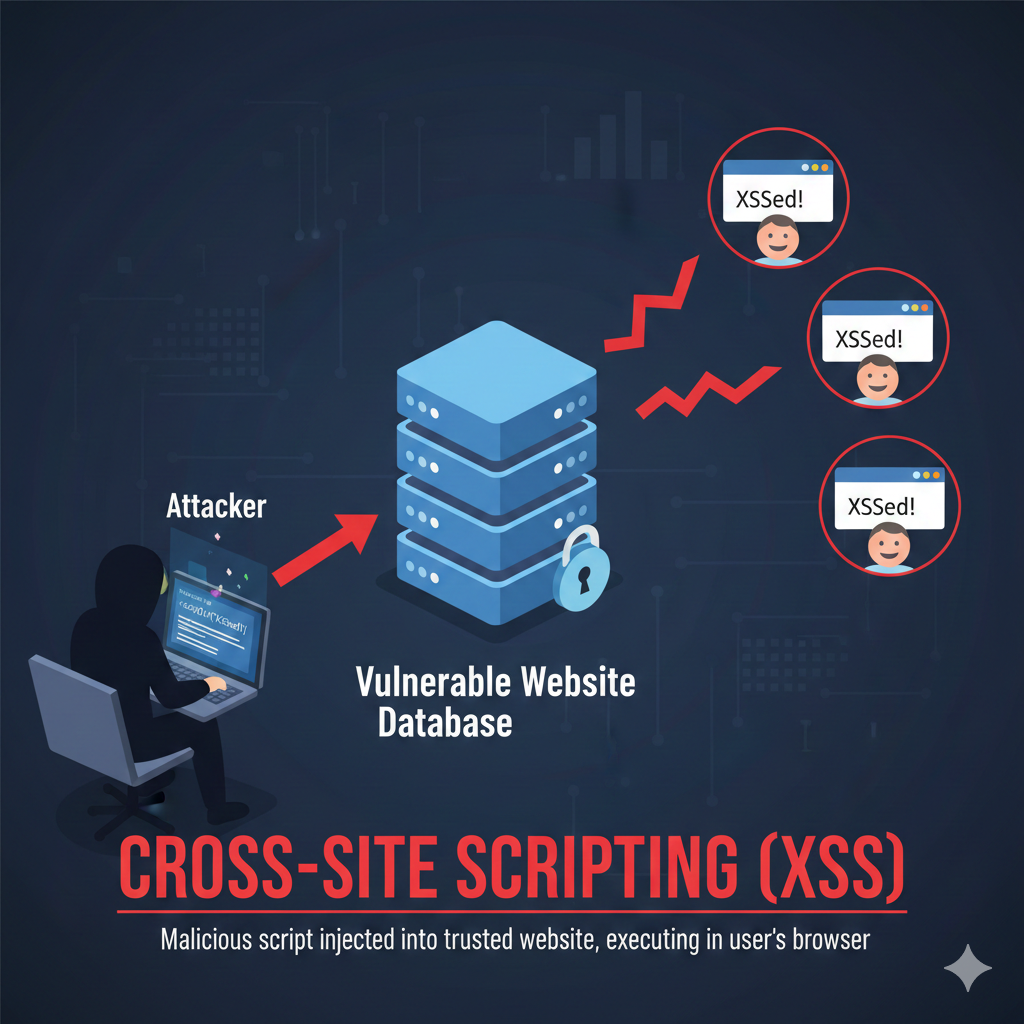
Here’s how the fundamental attack chain works:
Phase 1 — Injection: An attacker identifies a vulnerability in your website where user input is accepted but not properly validated or sanitized. This could be a comment form, search box, contact form, or even URL parameters. The attacker then plants malicious JavaScript code through this vulnerable input point.
Phase 2 — Execution: When a legitimate visitor views the page containing the malicious script, their browser executes the code because it appears to come from your trusted website. The browser has no way of knowing whether the script is malicious or legitimate site functionality.
The danger of JavaScript in this context cannot be overstated. When malicious scripts execute in a visitor’s browser, they gain access to everything your legitimate site can access: session cookies, authentication tokens, form data, and the ability to make HTTP requests on behalf of the user.
This is what makes XSS attacks so powerful — attackers can essentially impersonate users or manipulate their experience without ever directly compromising your server.
In WordPress specifically, common vulnerable points include comment sections, search fields, custom fields in posts or user profiles, contact forms, and REST API endpoints. Any feature that accepts and displays user input without proper security measures can potentially be exploited for XSS attacks.
Types of XSS Attacks in WordPress
Understanding the different types of XSS attacks helps you identify vulnerabilities and implement appropriate strategies more effectively. There are four primary categories:
Stored (Persistent) XSS
Stored XSS is the most dangerous form of cross-site scripting attack. In this scenario, the malicious script is permanently saved to your website’s database or server. Once stored, the script executes every time a visitor views the affected page, potentially infecting hundreds or thousands of users over time.
Common attack vectors for stored XSS include comment sections where attackers post comments containing malicious scripts, user profile fields where biographical information can include harmful code, and form submissions that save data to your database without proper sanitization.
For example, imagine an attacker posts a comment on your blog that includes a <script> tag with malicious JavaScript. If your comment system doesn’t sanitize this input before saving it to the database, that script becomes part of your site’s content. Every visitor who reads that blog post will unknowingly execute the malicious code, potentially exposing their session cookies or login credentials to the attacker.
Reflected (Non-Persistent) XSS
Reflected XSS attacks occur when malicious scripts are delivered via URL parameters and immediately reflected back in the website’s response without being stored on the server. These attacks require the victim to take action, typically by clicking on a crafted malicious link.
Attackers often spread reflected XSS attacks through phishing emails, malicious ads, or social media posts. The crafted URL contains the malicious payload as a parameter. When the victim clicks the link, the vulnerable website reflects this input back in the page response — often in search results, error messages, or other dynamic content — and the victim’s browser executes the script.
For instance, an attacker might send an email with a link like: yoursite.com/search?q=<script>malicious-code</script>. If your search results page displays the search query without proper encoding, the browser will execute the script when rendering the results.
DOM-Based XSS
DOM-based XSS is more sophisticated because the vulnerability exists entirely in client-side JavaScript code rather than on the server. The attack manipulates the Document Object Model (DOM) structure in the visitor’s browser without the malicious payload ever being sent to your web server.
This type of attack exploits JavaScript code that dynamically modifies page content based on user input without proper validation. For example, if your site uses JavaScript to read URL fragments (the part after #) or query parameters and inserts this data into the page, an attacker can craft a URL that injects malicious code.
A common scenario involves language selectors or filtering features that use JavaScript to read URL parameters and update the page content. If this JavaScript doesn’t sanitize the input before modifying the DOM, attackers can inject malicious scripts that execute in the user’s browser.
DOM-based XSS is particularly challenging to detect because traditional server-side security scanning cannot see the vulnerability — it exists purely in the client-side code execution.
Blind XSS
Blind XSS attacks target areas of your website that attackers cannot directly view, such as admin panels, log viewers, or support ticket systems. When an attacker submits malicious code through a public form, it might be stored and later displayed to administrators or support staff in a backend interface.
Because attackers cannot see the results immediately, they often use “polyglot” payloads — scripts designed to work in multiple contexts (HTML, JavaScript, attributes) to maximize the chances of successful execution. When an administrator views the infected content in their dashboard, the script executes with their elevated privileges, potentially giving the attacker complete control over your site.
Why WordPress Sites Are Targeted
WordPress sites face heightened XSS risks due to a combination of popularity and architectural factors that create multiple attack vectors.
- Massive Market Share: WordPress powers 43% of all websites globally, offering attackers the largest potential target base. A single vulnerability discovered in a popular plugin can instantly expose millions of sites, making WordPress an attractive focus for malicious actors.
- Plugin Ecosystem Variability: With over 60,000 plugins available, code quality and security practices vary dramatically. While many plugins are well-maintained, others may be abandoned, poorly coded, or developed by teams without deep security expertise — creating numerous potential vulnerabilities.
- Third-Party Theme Risks: Themes from different developers don’t uniformly follow secure coding practices. Some themes directly handle user input or output without proper sanitization, introducing XSS vulnerabilities that persist regardless of WordPress core security.
- Open-Source Transparency: WordPress’s open-source nature is both a strength and a challenge. While it enables rapid community-driven security improvements, it also allows attackers to study the codebase, identify weaknesses, and develop exploits before sites are patched.
- REST API Attack Surface: WordPress’s REST API, while powerful for building dynamic applications, creates additional endpoints that can become XSS vectors if developers don’t properly validate and sanitize API inputs and outputs.
The Devastating Impact of XSS Attacks on Your WordPress Site
XSS attacks may seem less threatening than direct server compromises, but their impact can be equally devastating for website owners and their users.
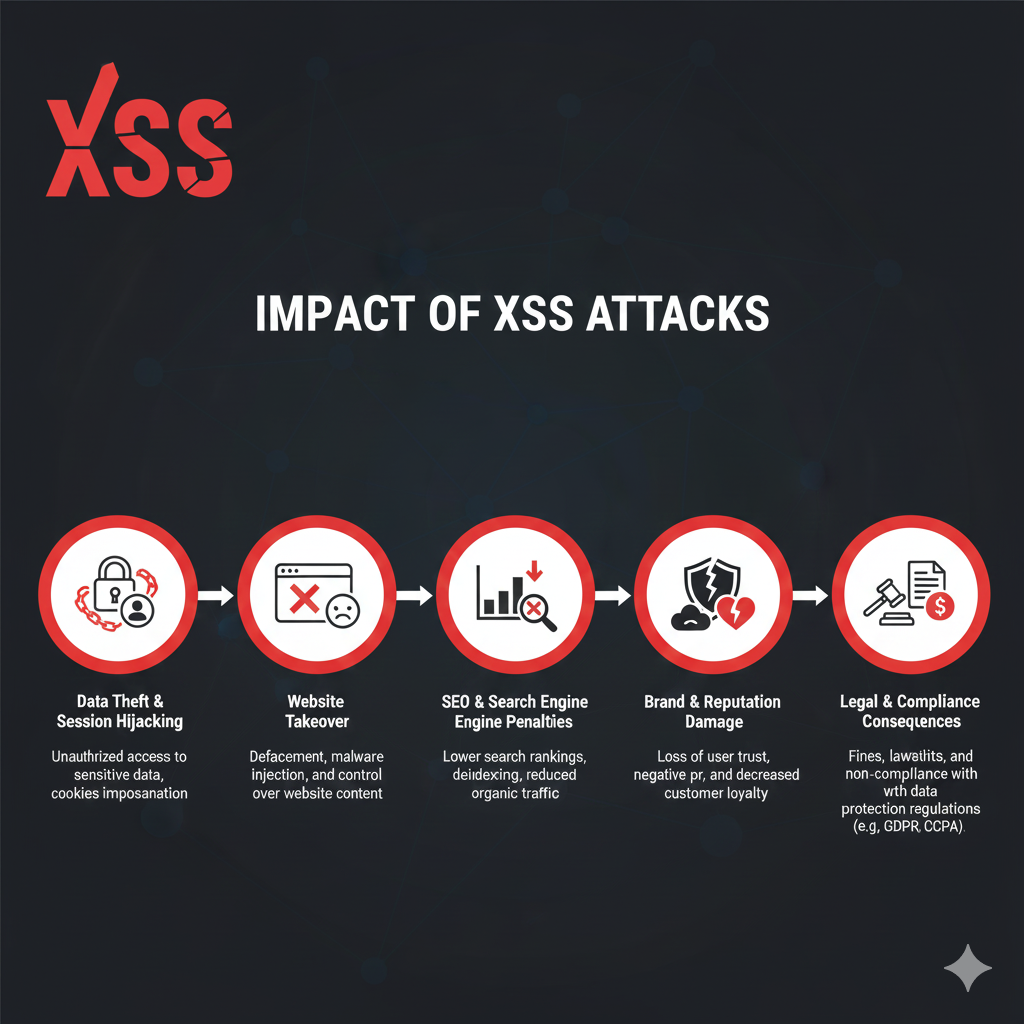
Data Theft & Session Hijacking
The primary goal of many XSS attacks is stealing sensitive information. When malicious scripts execute in a visitor’s browser, they can access authentication cookies and session tokens, allowing attackers to impersonate legitimate users without knowing their passwords. For e-commerce sites, this can mean access to customer payment information, order histories, and personal details. If an administrator’s session is hijacked, attackers gain complete control over your website.
Website Takeover
Once attackers steal an administrator’s session cookies through XSS, they can create additional rogue admin accounts for persistent access, install backdoors that survive security cleanups, modify core WordPress files to inject malware, and manipulate your site’s content or functionality. The attacker maintains this access even after the original XSS vulnerability is patched, making thorough cleanup essential.
SEO & Search Engine Penalties
XSS attacks frequently involve injecting spammy links to malicious websites, pharmaceutical sites, or gambling pages into your content. Search engines like Google detect these unauthorized changes and may blocklist your site, displaying “This site may harm your computer” warnings to potential visitors. The resulting traffic loss can be severe, and recovery often takes months even after cleaning the infection.
Additionally, XSS-driven content manipulation increases bounce rates and reduces user engagement, signaling to search engines that your site provides poor user experience, further damaging your rankings.
Brand & Reputation Damage
Attackers can use XSS to deface your website, displaying inappropriate or offensive content that damages your brand image. Visitors who experience security issues, JavaScript redirects, or data theft will lose trust in your business. News of a security breach spreads quickly through social media and review sites, creating lasting reputational harm that affects customer relationships and business credibility.
Legal & Compliance Consequences
Data protection regulations like GDPR impose strict requirements for safeguarding user data. If an XSS attack leads to a data breach that exposes personal information, your business faces potential fines of up to €20 million or 4% of annual global revenue, whichever is higher. Industry-specific regulations like PCI DSS for payment processing or HIPAA for healthcare add additional compliance burdens and penalties.
Beyond regulatory fines, you may face civil lawsuits from affected customers seeking damages for stolen data or identity theft resulting from your security failures.
Real-World Case Study: WooCommerce XSS Vulnerability
In June 2024, a critical XSS vulnerability in WooCommerce demonstrated how even trusted platforms can introduce serious security flaws through new features.
The Vulnerability: WooCommerce version 8.5 (January 2024) introduced an Order Attribution feature using the Sourcebuster.js library to track customer traffic sources. When WooCommerce modified this feature in version 8.8 (March 2024), they created a reflected XSS vulnerability affecting checkout and registration pages.
Security researcher ecaron discovered the flaw (CVE GHSA-cv23-q6gh-xfrf) and disclosed it through WooCommerce’s HackerOne Bug Bounty program. Affected versions: 8.8.0-8.8.4 and 8.9.0-8.9.2.
The flaw: WooCommerce used data from Sourcebuster.js — which reads URL parameters and referrer information — to dynamically construct hidden form fields without proper sanitization. Attackers could craft malicious URLs with JavaScript payloads that executed when victims visited checkout or registration pages.
The Attack & Impact: Attackers distributed malicious links through phishing emails (“Get 20% off!”), ads, and social media. When victims clicked these seemingly legitimate store URLs, malicious scripts executed in their browsers, enabling:
- Credit card skimming during checkout
- Session cookie theft
- Account takeover
- Payment redirection to attacker-controlled accounts
Real-world impact: On June 10, 2024 (disclosure day), one store owner reported ~200 exploitation attempts within hours. With Order Attribution enabled by default in 6.6 million WooCommerce stores, hundreds of thousands were immediately vulnerable. Affected stores faced PCI DSS violations, GDPR fines (up to €20M or 4% of revenue), chargebacks, lawsuits, and reputation damage.
How to Detect and Prevent XSS Vulnerabilities on Your WordPress Site
Proactive detection of XSS vulnerabilities allows you to address security gaps before attackers exploit them. Here are several approaches to identifying potential issues:
-
Security Scans
Run security scans weekly or immediately after major site changes using Malcure Malware Scanner. This comprehensive scanner examines your database and files for suspicious scripts and compares core files against clean WordPress installations. The scan results will list all the unexpected
<script>tags in database content, JavaScript event handlers likeonclickoronerrorembedded in user-generated content, and obfuscated JavaScript code designed to bypass basic security filters.Upgrade to Malcure Advanced Edition to inspect, delete and repair infected files directly via WordPress dashboard.
-
Manual Code Review
For custom themes or plugins, conduct periodic audits of security-critical areas. Start by reviewing all user input points, including forms, search boxes, comment fields, custom fields, and URL parameters. Next, identify where user data is displayed and verify proper escaping is implemented. During your review, ask these key questions: Is input sanitized when it enters the system? Is output escaped before rendering? Are WordPress nonces used for form validation? Are custom REST API endpoints properly validated? Are file uploads restricted to safe types?
-
Log Monitoring
Actively monitoring your website’s access logs provides early warning signs of XSS attack attempts or successful exploitations. Regular log analysis helps you identify suspicious patterns before they escalate into full-scale breaches. Watch specifically for these attack indicators: long query strings with HTML/JavaScript syntax, repeated requests with
<script>orjavascript:patterns, failed authentication after suspicious page access, and unusual traffic spikes from unfamiliar locations. Additionally, review your activity logs regularly for signs of compromise including unauthorized content changes, new admin accounts appearing without authorization, and unexpected plugin installations. -
Browser Testing
Browser developer tools offer a hands-on approach to test how your site handles potentially malicious input in real-time. This practical testing method helps you verify that your security measures are working correctly before attackers discover vulnerabilities. Use your browser’s built-in developer tools to simulate XSS attacks and confirm proper input encoding: Open browser developer tools (press F12 in most browsers), navigate to pages with input fields, enter test payloads like
<script>alert('test')</script>, verify the script doesn’t execute and input is properly encoded, and check for Content Security Policy headers in the Network tab. Good policies showscript-src 'self'or nonce-based directives; avoid'unsafe-inline'or*which weaken XSS protection.
How to Prevent XSS Attacks: WordPress Security Best Practices
Preventing XSS attacks and securing your WordPress website requires a multi-layered approach. No single technique provides complete protection, but combining these strategies creates robust defense in depth:
- Input Validation & Sanitization: When developing or auditing WordPress plugins control what data enters your system by validating that submitted data matches expected values. Use allowlist approaches for predictable fields (dropdowns, checkboxes). Restrict HTML in user inputs — prefer Markdown or BBCode for formatting. Before saving data to your database, use WordPress sanitization functions:
sanitize_text_field(),sanitize_email(),sanitize_url(), andwp_kses()for HTML with allowed tags. Validate data types to ensure email fields contain valid addresses, number fields contain only numbers, and URLs are properly formatted. - Output Encoding & Escaping: Even more critical than input sanitization is output encoding. Never display user-provided data without encoding it first — convert special characters to HTML entities so browsers display them as text rather than executing them as code. Use WordPress context-specific escaping functions:
esc_html()for HTML content,esc_attr()for HTML attributes,esc_url()for URLs,esc_js()for JavaScript strings, andwp_kses_post()for content allowing some HTML tags. Context matters — data in HTML requires different encoding than data in JavaScript strings or CSS rules.Critical: Escape even data from your own database. If an attacker injects malicious content through a compromised admin account, output encoding prevents execution.
- Content Security Policy (CSP): Implement CSP headers that instruct browsers to only execute scripts from approved sources and block inline JavaScript and
eval()functions that attackers commonly use. Add CSP headers through your .htaccess file, web server configuration (Apache, Nginx), or WordPress code using thewp_headersfilter. Example policy:Content-Security-Policy: default-src 'self'; script-src 'self' https://trusted-cdn.com; object-src 'none'; base-uri 'self';— this allows resources only from your domain, scripts from your domain and trusted CDN, blocks plugins/Flash, and prevents base tag injection. Start with CSP in report-only mode to identify legitimate scripts that might be blocked before enforcing. - HTTPOnly Cookie Flags: Set the HTTPOnly flag on cookies to prevent JavaScript from accessing them, blocking the most common XSS attack vector — cookie theft. Even if malicious scripts execute, they cannot read session cookies. Also enable the Secure flag (ensures cookies only transmit over HTTPS) and SameSite attribute (prevents cookies from being sent with cross-site requests). Note that while HTTPOnly prevents cookie theft, attackers can still submit forms or make requests using the victim’s active session without directly accessing cookies.
- Disable File Editing: Add
define('DISALLOW_FILE_EDIT', true);to your wp-config.php file to remove the theme and plugin editor from the WordPress admin panel. This prevents attackers who gain admin access through XSS from directly modifying PHP files to install backdoors or malware. - WordPress Nonces: Implement WordPress nonces — security tokens that verify requests come from your site rather than cross-site attacks. Use
wp_nonce_field()in forms andwp_verify_nonce()to validate submissions. This prevents attackers from submitting malicious forms on behalf of authenticated users. - Two-Factor Authentication (2FA): Require 2FA for all administrator accounts and highly privileged users. Even if attackers steal passwords through XSS, they cannot log in without the second factor. Combine this with strong password policies (12+ characters with complexity requirements) and automatic session timeouts for inactive users.
- Keep Everything Updated: Outdated software is the leading cause of successful XSS attacks. Update WordPress core immediately when security releases are announced and enable automatic updates for minor releases. Keep all themes and plugins updated — delete deactivated plugins and unused themes entirely, as even inactive code can contain exploitable vulnerabilities.
- Limit User Permissions: Follow the principle of least privilege — grant users only the minimum permissions necessary for their role. Regularly review user accounts and remove unused accounts or downgrade permissions. For file uploads, implement strict controls: validate file extensions using allowlists, check MIME types (not just extensions), limit file sizes, scan uploaded files for malicious code, and store uploads outside the web root when possible.
- Web Application Firewall (WAF): Deploy a WAF to filter malicious traffic before it reaches your WordPress site. WAFs inspect incoming HTTP requests for attack patterns and block suspicious traffic, including XSS-specific patterns like
<script>tags, JavaScript event handlers, and encoded payloads. WAFs provide “virtual patching” — when vulnerabilities are disclosed but patches aren’t yet installed, WAFs block exploitation attempts.
Frequently Asked Questions
How can I tell if my WordPress site has been hit by an XSS attack?
Watch for these warning signs: unauthorized admin accounts in your Users section, unexpected content changes like injected links in posts or comments, suspicious log activity such as unauthorized file modifications or plugin installations, unusual traffic spikes from unfamiliar locations, Google Search Console security warnings, and user reports of strange behavior including unwanted popups, JavaScript redirects, or login issues. Run security scans weekly and monitor activity logs to catch these indicators early.
Is WordPress Core vulnerable to XSS attacks?
WordPress core is generally very secure — only about 2% of disclosed WordPress vulnerabilities originate from core software. The WordPress security team responds rapidly to discovered issues, often patching multiple vulnerabilities simultaneously (version 6.0.3 fixed 16 vulnerabilities in one release). However, running outdated versions leaves you vulnerable to known exploits. The primary XSS risk comes from the plugin and theme ecosystem, where code quality varies significantly. Always keep WordPress core, plugins, and themes updated.
Can XSS attacks be prevented entirely?
While no site can claim 100% immunity, XSS is largely preventable with proper practices. You can reduce risk to negligible levels through layered defenses: input validation, output encoding, Content Security Policy, HTTPOnly cookies, Web Application Firewall, and regular updates. Even if a vulnerability exists, proper cookie security and CSP headers severely limit the damage attackers can cause. The key is maintaining a proactive security approach and patching vulnerabilities rapidly when discovered.
Do I need security plugins, or can I handle XSS protection manually?
Core XSS protection requires proper coding practices (input sanitization, output escaping, validation). Experienced developers with strong security knowledge can implement these manually. However, security tools provide valuable additional layers: Web Application Firewalls block attacks in real-time, regular scanning detects vulnerabilities before exploitation, activity monitoring identifies suspicious behavior, and simplified update management ensures timely patches. The strongest approach combines secure coding with security tools and regular audits — layered security is always more effective than any single measure.
Protect Your WordPress Site From XSS Attacks
Cross-Site Scripting attacks are among the most dangerous website security threats facing WordPress sites. The good news? XSS is largely preventable. By implementing layered security—input validation, output encoding, Content Security Policy, cookie hardening, and regular updates—you can dramatically reduce your site’s vulnerability.
Take action now to prevent XSS attacks:
- Audit your highest-risk input points—forms, comment sections, and user input fields
- Implement output escaping in custom code—review themes and plugins for proper escaping functions
- Add CSP headers—start in report-only mode, then enforce
- Enable HTTPOnly and Secure cookie flags—update your PHP session configuration
- Review user permissions—apply principle of least privilege
- Keep everything updated—WordPress core, plugins, and themes
If your WordPress site has been compromised by an XSS attack, time is critical. Malcure’s professional malware removal service provides complete site recovery—removing malicious code, closing vulnerabilities, restoring accounts, and preventing reinfection. Our security experts handle the cleanup so you can focus on your business.