In 2024, the LayerSlider WordPress plugin vulnerability (CVE-2024-2879) with a CVSS score of 9.8 exposed over 1 million websites to unauthenticated SQL injection attacks. The Ultimate Member plugin suffered a similar fate with a critical 9.8 CVSS rating (CVE-2024-1071) affecting hundreds of thousands of sites. These aren’t isolated incidents — SQL injection remains the third most serious web application security risk according to OWASP, and WordPress sites running 43% of the web are prime targets. Learning how to prevent WordPress SQL injection is essential for any site owner serious about security.
If you think your small blog or business site is safe because “hackers only target big companies,” think again. Automated bots scan thousands of sites hourly, looking for vulnerable plugins and themes. Once they find a weakness, they can steal customer data, inject malware, delete your content, or completely take over your website.
This guide will show you exactly what SQL injection is, how to detect vulnerabilities, and most importantly — how to prevent these attacks using proven security measures.
Table of Contents
- What is SQL Injection?
- Types of SQL Injection Attacks
- Why SQL Injection is Dangerous
- How to Detect WordPress SQL Injection Vulnerabilities
- 10 Steps to Prevent SQL Injection in WordPress
- Step 1: Keep WordPress Core, Plugins, and Themes Updated
- Step 2: Install a Web Application Firewall (WAF)
- Step 3: Change Your Database Prefix
- Step 4: Implement the Principle of Least Privilege
- Step 5: Enable Two-Factor Authentication (2FA)
- Step 6: Maintain Regular Backups
- Step 7: Disable File Editing in WordPress Dashboard
- Step 8: Implement Database Security Hardening
- Step 9: Regular Security Scanning
- Step 10: Establish Security Maintenance Routines
- How to Recover from a WordPress SQL Injection Attack
- Frequently Asked Questions
- What is WordPress SQLi?
- What makes SQL injection on WordPress so dangerous?
- Why are outdated plugins a major risk for SQL injection vulnerabilities?
- How do I identify if my WordPress site has already been compromised by SQL injection?
- Can I clean up SQL injection malware myself?
- How long does professional SQL injection cleanup take?
What is SQL Injection?
Quick Answer: SQL injection (SQLi) is a cyberattack where hackers inject malicious database commands into WordPress input fields to steal data, create admin accounts, or take full control of your website.
SQL injection (SQLi) is a cyberattack technique where hackers insert malicious SQL commands into input fields on your website — like search boxes, contact forms, login fields, or URL parameters. When these malicious commands reach your WordPress database, they can manipulate, steal, or destroy your data.
How WordPress Databases Work
Your WordPress site relies on a MySQL or MariaDB database to store everything: posts, pages, user credentials, comments, settings, and plugin data. When someone visits your site, WordPress queries this database using Structured Query Language (SQL) to retrieve and display content.
Here’s a simple example of a normal database query:
SELECT * FROM wp_users WHERE username = 'john' AND password = 'hashed_password'This query checks if a user exists with the given credentials.
The Attack Mechanism
SQL injection exploits occur when user input isn’t properly validated or sanitized before being used in database queries. Here’s how a vulnerable login form might construct a query:
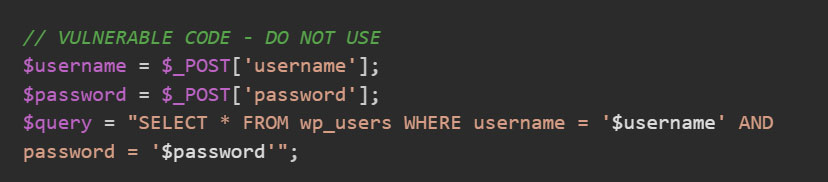
A hacker could enter this as the username: admin’ OR ‘1’=’1′--
The resulting query becomes:

The -- comments out the rest of the query, and since '1'='1' is always true, this grants access without knowing the password.
Common Entry Points
SQL injection attacks typically exploit these vulnerable areas:
- Search bars: Especially those that search custom post types or metadata.
- Contact and comment forms: Any form that processes user input.
- Login and registration pages: Authentication systems are prime targets.
- URL parameters: Query strings like
?id=123or?category=news - REST API endpoints: Custom endpoints that don’t validate input.
- Plugin and theme code: Third-party code with poor security practices.
Types of SQL Injection Attacks
Understanding the different attack types helps you recognize and defend against them:
In-Band SQL Injection (Classic): The most common and straightforward type where attackers use the same channel to launch the attack and gather results.
- Error-based SQLi: Hackers deliberately cause database errors to reveal information about your database structure through error messages.
- Union-based SQLi: Attackers use the SQL UNION operator to combine their malicious query with legitimate queries, extracting data directly.
Blind SQL Injection: When error messages are disabled or generic, attackers can’t see direct results but still extract data:
- Boolean-based SQLi: Hackers send queries that return true/false responses, extracting data character by character by analyzing how the application responds.
- Time-based SQLi: Uses SQL commands like SLEEP() to cause delays. If the response is delayed, the condition is true; if instant, it’s false.
Out-of-Band SQL Injection: Less common but highly sophisticated — attackers force the database to send data to external servers they control, bypassing normal response channels entirely.
Why SQL Injection is Dangerous
The consequences of a successful SQL injection attack can be devastating:
- Complete Data Breach: Hackers can extract your entire database, including customer information, email addresses, phone numbers, purchase history, and even hashed passwords. For e-commerce sites running WooCommerce, this means payment information could be compromised.
- Full Website Takeover: Attackers can create new admin accounts, elevate their privileges, or modify existing admin credentials, giving them complete control over your WordPress dashboard. From there, they can install malicious plugins, deface your site, or use it to attack others.
- Malware Injection: With database access, hackers can inject malicious code into your posts, pages, or theme files. This malware might redirect visitors to phishing sites, display unwanted advertisements, or turn your site into a distribution point for malware.
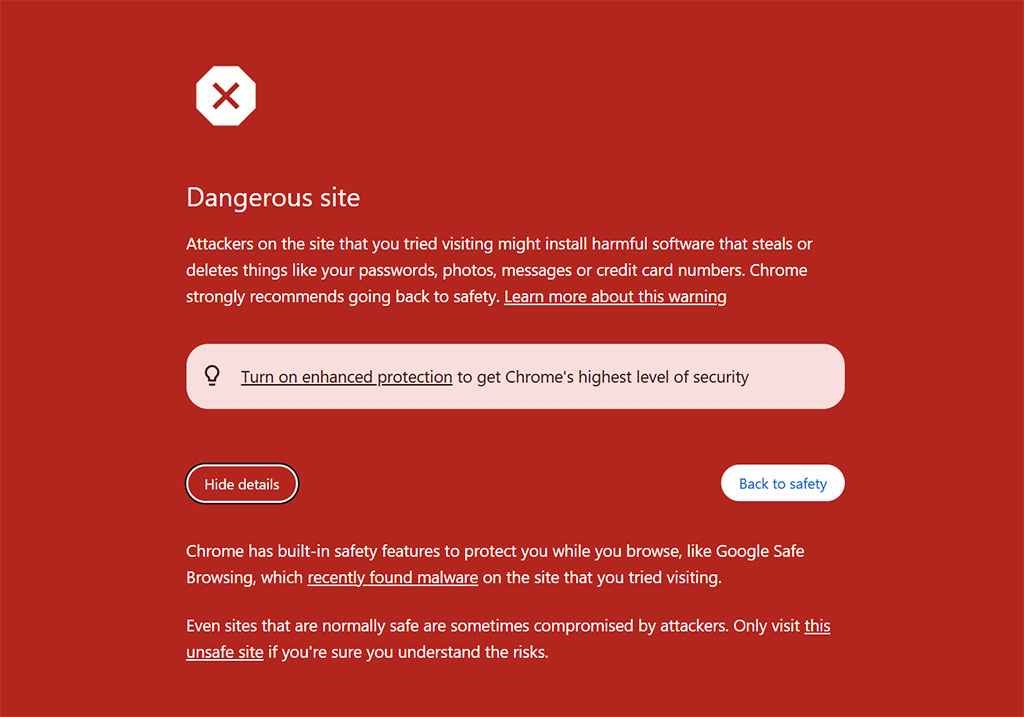
- Google Blacklisting: When Google detects malware or suspicious activity on your site, it adds you to its blacklist. Visitors see scary “This site may harm your computer” warnings, and your search rankings drop.
How to Detect WordPress SQL Injection Vulnerabilities
SQL injection is particularly challenging to detect because it doesn’t leave obvious traces like other attacks. The malicious code executes as legitimate database queries, making it nearly invisible until damage occurs — often only discovered after hackers have already stolen data or created backdoor access.
Proactive website monitoring and regular vulnerability scanning are essential to catch these threats early. Here are some warning signs which indicate that your site may be compromised:
- Unexpected Database Errors: Random error messages mentioning SQL, database tables, or query syntax might indicate someone is testing for vulnerabilities.
- Unauthorized Admin Accounts: Check your Users list regularly. Unknown administrator accounts are a red flag that someone gained unauthorized access.
- Strange Database Behavior: Slow query performance, unexpected database size increases, or connection errors could indicate malicious activity.
- Google Search Console Warnings: Security warnings in Search Console about malware or suspicious content often follow successful SQL injection attacks.
- Host Suspension Notices: Web hosts monitor for malicious activity. If your host sends security warnings or temporarily suspends your site, investigate immediately.
10 Steps to Prevent SQL Injection in WordPress
Protecting your WordPress site from SQL injection attacks doesn’t require advanced programming knowledge. While developers should always use prepared statements with WordPress’s wpdb->prepare() method and properly validate all input data (and also avoid these common mistakes and vulnerability patterns), site owners can implement powerful security measures through proper configuration, smart plugin choices, and consistent maintenance routines. These 10 steps provide a comprehensive defense strategy that you should follow to prevent an SQLi attack.
Step 1: Keep WordPress Core, Plugins, and Themes Updated
According to a WordPress Security Report from Patchstack (in partnership with Sucuri), 87% of vulnerabilities exist in plugins, 11% in themes, and only 2% in WordPress core. When security researchers discover vulnerabilities, developers release patches — but they only protect you if you install them. Regular updates are the foundation of WordPress SQLi prevention.
Action Steps:
- Enable automatic updates for WordPress minor releases by adding to
wp-config.php:define(‘WP_AUTO_UPDATE_CORE’, true); - Enable automatic plugin updates from Plugins → Installed Plugins → Enable Auto-updates. Enable this feature only for the non-critical plugins that don’t alter design or functionality of your site.
- Remove unused plugins and themes — Even deactivated components can be exploited. An SQL injection WordPress plugin vulnerability can compromise your entire site.
- Subscribe to security bulletins: WPScan Vulnerability Database, Wordfence Intelligence, Patchstack Database are some of the important ones to keep an eye on.
- Monthly Update Routine: Check for updates every month, update staging site first (if available), back up before major updates, and test critical functionality after updates.
Step 2: Install a Web Application Firewall (WAF)
A WAF sits between your website and the internet, filtering malicious requests before they reach WordPress. It recognizes SQL injection attack patterns and blocks them automatically. It acts as a security checkpoint that examines every request to your website, recognizing attack patterns like SQL injection attempts and blocking them before they can harm your database. Installing a WAF is one of the most effective ways to protect WordPress from SQL injection attacks.

Services like Sucuri or Cloudflare filter traffic before it reaches your server, providing the strongest protection layer. While Wordfence provides firewall protection at the application level, blocking attacks after they reach your server but before they execute.
Step 3: Change Your Database Prefix
WordPress uses wp_ as the default prefix for all database tables. This makes it easier for attackers since they know exactly what to target. Changing this prefix adds an extra layer of security through obscurity.
You should follow this practice at the time of installing and setting up WordPress. But if at all you need to update it for the live site, it’s very important to first back up your database completely before proceeding! Here’s a guide which covers both the approaches; manually as well as via plugin.
Step 4: Implement the Principle of Least Privilege
The principle of least privilege means giving users and applications only the minimum access they need. If hackers exploit a vulnerability, limited permissions restrict the damage they can cause — they might read data but can’t delete your entire database. Regularly check the user accounts in your WordPress dashboard and make sure to:
- Limit administrator accounts to 1-2 trusted people.
- Use Editor or Author roles for content creators.
- Regularly audit user list and remove inactive accounts.
- Never share admin credentials.
For Database Access: Your WordPress database user should only have these permissions: SELECT, INSERT, UPDATE, DELETE.
Step 5: Enable Two-Factor Authentication (2FA)
Even if attackers discover an SQL injection vulnerability, 2FA adds a critical extra barrier by requiring a second verification method beyond passwords. Most security plugins for WordPress include 2FA functionality, or you can implement it through standalone authentication services. Here are quick tips for 2FA Implementation:
- Use time-based one-time passwords (TOTP) with authenticator apps.
- Generate and securely store recovery codes.
- Require 2FA for all administrator accounts.
- Consider SMS backup for accessibility.
- Set grace periods for user adoption.
Step 6: Maintain Regular Backups
Backups won’t prevent SQL injection, but they’re your insurance policy if the worst happens.
Backup Best Practices:
- What to Back Up: Complete database, all WordPress files (themes, plugins, uploads) and configuration files.
- Backup Schedule: Daily for high-traffic e-commerce sites, weekly for active blogs and business sites and monthly for static or rarely updated sites. Set up a daily backup schedule for database irrespective of what kind of site you are running.
- Where to Store Backups: Multiple locations (3-2-1 rule: 3 copies, 2 different media, 1 off-site). You can use Amazon S3, Google Drive, Dropbox for off-site cloud storage, and download a copy to the local storage (external hard drive) as well.
- Create a manual backup before updating WordPress core, themes, or plugins. Most attacks exploit the window between vulnerability disclosure and when sites actually update.
Step 7: Disable File Editing in WordPress Dashboard
By default, WordPress allows administrators to edit theme and plugin files directly from the dashboard. This feature becomes dangerous if attackers gain admin access through SQL injection.
Add the following command to wp-config.php to disable file editing through WordPress dashboard:
define('DISALLOW_FILE_EDIT', true);This simple addition prevents anyone — including compromised admin accounts — from modifying PHP files through the WordPress interface.
Step 8: Implement Database Security Hardening
WordPress database security starts with your wp-config.php file, which contains critical database credentials and security keys that attackers target in SQL injection attacks. Use strong, unique database credentials — never reuse passwords from other services. Shuffle security salts and keys regularly using WordPress’s salt generator, as these encrypt authentication cookies and sessions.
Enable WordPress debug logging to track potential security issues without exposing sensitive information to attackers. This configuration captures security-related errors in a log file rather than displaying them publicly on your site. Attackers often use error messages to map your database structure, so hiding these details while maintaining logs for troubleshooting provides the best security balance.
Step 9: Regular Security Scanning
Proactive scanning catches vulnerabilities before attackers exploit them. Malcure Malware Scanner is a full-fledged, super-precise malware scanner. It scans your website’s database and complete file system for malicious code injections. And the best part is it also comes with a built-in vulnerability scanner which lists all the vulnerable themes and plugins.
Malcure Advanced Edition takes malware scanning and removal to the next level. It enables you to clean, repair, or trust specific files each with a single-click to instantly restore a clean, high-performing site.
Establish a consistent scanning schedule based on your site’s risk profile. Active blogs and business sites need weekly scans at minimum, while high-value e-commerce sites handling customer data should scan daily. Always run immediate scans after installing or updating any plugins or themes, and when security news mentions vulnerabilities in software you use — attackers move fast once exploits become public.
Step 10: Establish Security Maintenance Routines
Security isn’t a one-time setup — it requires ongoing maintenance to stay ahead of evolving threats. Establish a monthly security routine that includes running full security scans, checking for plugin and theme updates, and reviewing user accounts and activity logs. Verify your backup integrity by testing restoration procedures, audit file permissions to ensure they haven’t been modified, and review server logs for attack attempts or suspicious patterns. Check for unauthorized database changes that might indicate a breach went undetected.
Every quarter, conduct a deeper security audit. Change all administrator passwords using strong, unique credentials. Review and update user roles and permissions, removing access for anyone who no longer needs it. Check SSL certificate validity to ensure encrypted connections remain active. Test your disaster recovery plan to confirm you can restore your site quickly if attacked. Review all third-party integrations and services connected to your site, verify your PHP version is current (outdated PHP versions contain known vulnerabilities), and evaluate your overall security posture against current best practices.
How to Recover from a WordPress SQL Injection Attack
SQL injection attacks can cause severe damage before you even realize your site has been compromised. If you suspect or confirm an attack, immediate professional intervention is critical to prevent further damage and ensure complete remediation.
Why Professional Help is Essential
SQL injection cleanup requires specialized expertise owing to the following reasons:
- Hidden Backdoors: Attackers often install multiple backdoors throughout your database and file system. Missing even one means they can regain access after you think the site is clean.
- Database Corruption: Malicious SQL queries can corrupt your database structure in ways that aren’t immediately apparent. For instance, in a recent Malcure malware cleanup case, our team identified 15,405 database infections. Professional tools and experience are needed to identify and repair this damage.
- Reinfection Risks: Without identifying the initial vulnerability, your site remains at risk. Security experts can pinpoint how attackers gained access and close those security gaps after conducting a root-cause analysis.
- Data Breach Assessment: Determining what data was compromised requires forensic analysis of database logs and query history. This is essential for compliance obligations (GDPR, CCPA, PCI-DSS) and customer notification requirements.
- Time-Sensitive Recovery: Every hour your site remains compromised, attackers can steal more data, infect more files, or use your server to attack other sites. Professional cleanup teams work quickly to minimize damage.
Discovered SQL injection malware on your site?
Time is critical. Malcure’s WordPress security experts specialize in complete malware removal, database sanitization, and vulnerability remediation. Our emergency response team works 24/7 to eliminate threats, remove backdoors, and restore your site’s security — 100% guaranteed. Get immediate help: Malcure WordPress Malware Removal Service
Frequently Asked Questions
What is WordPress SQLi?
WordPress SQLi refers to SQL injection attacks targeting WordPress websites. These attacks exploit vulnerabilities in plugins, themes, or custom code to inject malicious database queries through user input fields like forms, search bars, and URL parameters.
What makes SQL injection on WordPress so dangerous?
SQL injection grants attackers direct database access, allowing them to steal all your data, create admin accounts, inject malware, and take complete control of your site. For e-commerce sites, payment information could be compromised, and successful attacks often lead to Google blacklisting.
Why are outdated plugins a major risk for SQL injection vulnerabilities?
87% of WordPress vulnerabilities exist in plugins. Outdated plugins remain exploitable even after patches are released. Automated bots continuously scan for known vulnerabilities and attempt SQL injection attacks within hours of discovery. Even deactivated plugins can be exploited if files remain on your server.
How do I identify if my WordPress site has already been compromised by SQL injection?
Look for unexpected database errors, unauthorized admin accounts, slow query performance, database size increases, Google Search Console warnings, or host suspension notices. However, SQL injection often executes silently, so run security scans using Malcure Malware Scanner regularly.
Can I clean up SQL injection malware myself?
We strongly advise against DIY cleanup. SQL injection attacks involve multiple backdoors throughout your database and file system. Missing even one means attackers retain access. Professional security teams have specialized tools to identify all compromise points and ensure complete remediation. Incomplete cleanup often leads to reinfection within days.
How long does professional SQL injection cleanup take?
Most WordPress SQL injection cleanups take 24-48 hours for complete remediation, though complex cases may require additional time. Malcure’s WordPress malware cleanup service provides regular updates throughout the process and doesn’t consider the job complete until all malware is removed, vulnerabilities are patched, and monitoring confirms no reinfection.